
I strongly suspect Claude’s Mac app is written by Claude.
That’s not a compliment.
There’s the non-native GUI, though of course that doesn’t tell you much in this day and age. It’s obviously just Chromium or something similar (hell, you can right-click on some things and they still have the “Inspect Element” contextual menu item, which does indeed open a very Chrome-looking web inspector).
There’s its general everyday bugginess – it frequently resets the scroll position of conversations to some arbitrary point miles back in time, for example. Or just abruptly removes focus from the text field while you’re in the middle of typing (doesn’t move it anywhere else, just defocuses). It smells, in a nutshell.
But the “vibe coding” stench really wafts in when you consider that [cynically] their most important user flow – the upsell – doesn’t even work.
I hit my usage limit for the week. So, I went into Settings, Billing, etc and upgraded to the “Max” level. I’d been thinking about this anyway, so I didn’t have any animosity around it – I’d just been wondering if it was worth it; if I’d use the extra quota.
Having done that successfully, I exit Settings, and go to resume my work – only to see my Code conversations are all still claiming I’ve hit the usage limit. And the input text field is disabled.

Ugh. Great. Bugs.
I go back into Settings to double-check – but no, I have in fact upgraded my account and do have plenty of quota left.
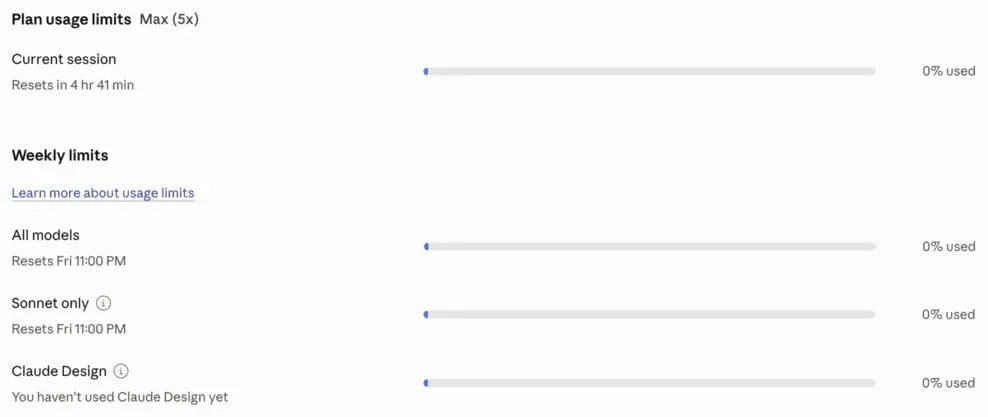
I restart the app, of course, but that doesn’t help. I click a whole bunch of buttons – I won’t bore you with the details, suffice to say there is no way to get the damn app to realise I have my entire quota left.
So I go to the Help menu and click the promisingly-titled “Get Support”. Which merely opens a page on Claude’s website, “How to get support“. Pro tip: if your product or website needs such a page, you’ve already failed at customer support.
That page tells me to go back to the app because the only avenue I have for communicating with them – even just to report a bug in their own damn app – is to use their support robot (via an incredibly obtuse GUI route – when your app has a Help menu, like every app, and it even includes a “Get Support” menu item, then why the fuck does it not just open your in-app support; why do you require an easter egg hunt through your GUI?! Oh, wait, it’s because this is not a native app and it bloody well shows.
Okay.
Fine.
Let’s just do this.
I follow their ridiculous instructions on how to ‘get support’, but then I get this.
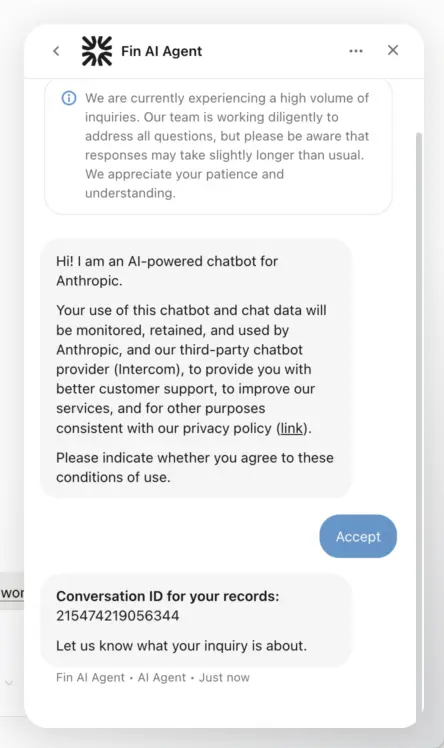
There’s something wrong with this picture. Look carefully, it might be hard to miss.
How the fuck am I supposed to talk to their bot? There’s no text input field.
This problem also persists across app relaunches.
They had no trouble taking my money – they billed me for the upgraded plan within seconds – but they seem to have trouble actually delivering the service I paid for.
And this is what’s considered state of the art today?

This is very frustrating. Thank you for sharing.
Instead of complaining here, write to their support
You didn’t read the short blog post, did you?
LOL.
Why would I entrust software like this to do ANYTHING on my computer?
I feel your pain. This is laughably bad. Kafka would admire their attention to detail in driving the user insane with stupidity
Begs the question: is this the kind of company you want to support financially? Is this the kind of company you want controlling the future?