Opus 4.8 and earlier use a 1M token context window (on any paid plan, at least). So it’s surprising that Anthropic quietly reduced this by 80% with Opus 5.
You can get the 1M token context window back, though – you just have to enable Usage Credits. You don’t have to pay for any usage credits, nor turn on auto-reload, nor have a non-zero limit. You literally just have to have the Usage Credits toggle enabled. 🤷♂️
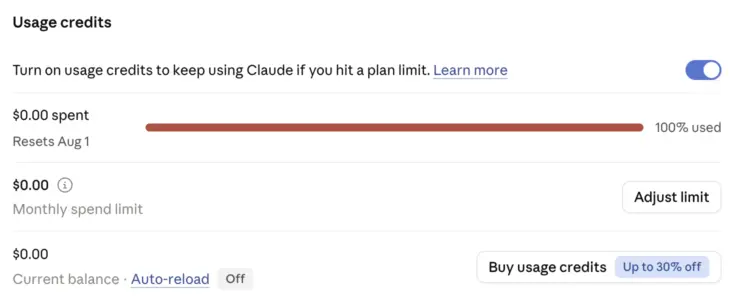
Why does the context window size matter? Especially for coding – where single tasks can be long-running and use very large numbers of tokens, for reading source files, mentally evaluating complex logic & control flow, and so forth – it’s important that everything fit into a single context window, for maximum efficacy of the model. If the model has to run compaction mid-way through a task, there’s a significant risk it’ll (a) ‘forget’ important details, and therefore make more mistakes, and (b) have to re-read or re-compute things, wasting tokens (i.e. your precious usage quota).
0.2M is pretty tiny by modern standards, and – because I do actually track token & context window usage somewhat, for edification if nothing else – I know that I regularly use far more than that in everyday coding tasks. In fact even 1M tokens isn’t a big enough window for the occasional task (though recent versions of Claude models tend to use subagents more aggressively, which helps avoid hitting the window limit – albeit at the expense of less token efficiency overall).
As to why Anthropic did this… I suppose it’s conceivable that they believe Opus 5 is so good at carrying context across compaction that it can get away with it? I haven’t tested it. That’d be wonderful, if true – a smaller context window is less computationally costly (and much less costly if you’re conversing back-and-forth a lot within a session).